ip
Duke User Guide
- Duke User Guide
- Quick start
- Features
- Viewing help
help - Adding tasks
todo,deadline,event - Listing all tasks
list - Deleting tasks
delete,clear - Completing tasks
done - Task priority
highpriority,lowpriority - Exiting the program
bye - Saving tasklist
save - Loading tasklist
load - Sorting tasklist
sort - Sample data
sample - Searching for tasks by name or date
search - Listviewer
- Keyboard shortcuts
- Viewing help
- Command summary
Quick start
-
Ensure you have Java
11or above installed in your Computer. -
Download the latest
Duke.jarhere. -
Copy the file to the folder you want to use as the home folder for your Duke.
-
Double-click the file to start the app. A GUI similar to the example below should appear in a few seconds.
Note: the example below contains some sample data.
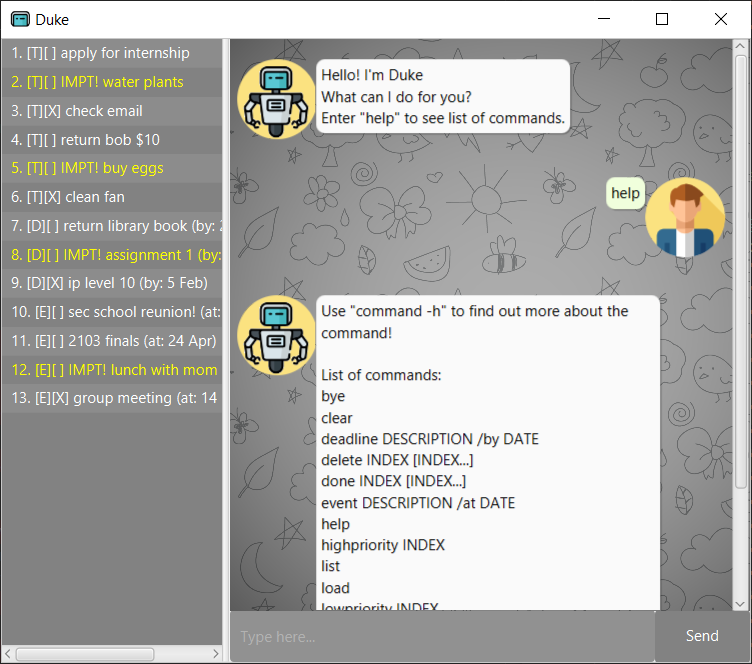
- Type the command in the command box and press Enter to execute it.
Some examples to start off:- Typing
helpwill list out all available commands. - Typing
samplewill fill Duke with some sample data.
- Typing
- Refer to the Features below for details of each command.
Features
Notes about the command format:
-
Words in
UPPER_CASEare parameters to be supplied by the user.
e.g. intodo DESCRIPTION,DESCRIPTIONis a parameter which can be used astodo buy eggs. -
Items in square brackets
[]are optional.
e.gdone INDEX [INDEX...]can be used asdone 1or asdone 1 2. -
Items with
… after them can be used multiple times including zero times.
e.g.[INDEX...]can be used as ` ` (i.e. 0 times),1,1 2 3etc. -
Items in curly bracket
{} are mutually exclusive.
e.g.search {KEYWORD | DATE}can only be used as eithersearch KEYWORDorsearch DATE.
Viewing help help
Format: help
Shows all available commands.
Adding tasks todo, deadline, event
Format: todo DESCRIPTION, deadline DESCRIPTION /by DATE, event DESCRIPTION /at DATE
Adds a task to the tasklist.
Current supports 3 types of tasks:
todo- A todo task is simply a task with a description.
deadline- A deadline task has a description and a due date.
DATEmust be in the valid formatYYYY-MM-DD.
event- An event task has a description and a date.
DATEmust be in the valid formatYYYY-MM-DD.
Examples:
todo buy eggsdeadline do math homework /by 2021-01-01event meeting with friends /at 2021-01-01
Listing all tasks list
Format: list
Shows a list of all tasks.
Deleting tasks delete, clear
Format: delete INDEX [INDEX...], clear
There are 2 ways to delete tasks:
delete- Deletes the task at the given
INDEX. INDEXmust be a valid number.- You can delete multiple tasks by listing out the indexes eg.
delete 1 2 3.
- Deletes the task at the given
clear- Clears all tasks.
A prompt for delete confirmation will be given.
Completing tasks done
Format: done INDEX [INDEX...]
After completing a tasks, you can mark it as done.
Incomplete tasks are marked with [ ]
Completed tasks are marked with [X].
Task priority highpriority, lowpriority
Format: highpriority INDEX, lowpriorty INDEX
Set a task to high or low priorty
- Newly added tasks are set to low priority by default.
- High priority tasks appear as yellow in the listviewer.
- High priority tasks will have an extra label “IMPT!”
- High priority tasks will be pushed to top of tasklist upon sort.
Exiting the program bye
Format: bye
Exits the program. A prompt to save current tasklist will be given.
Saving tasklist save
Format: save
Saves the current tasklist into [JAR file location]/data/dukeData.txt.
Loading tasklist load
Format: load
Load a previously saved tasklist from [JAR file location]/data/dukeData.txt.
Duke will automatically load data from this location on startup, if it is available.
Warning: If this file is edited into an invalid format, Duke will start up with an empty tasklist.
Sorting tasklist sort
Format: sort
Sorts the tasklist with the following order:
- High priority task
- Incomplete task
- Todo task
- Task with eariler date
- Lexicographically
Sample data sample
Format: sample
Fills Duke with sample data for new users to get a feel of the task manager.
Warning: Calling sample will overwrite any current tasks in the tasklist.
Searching for tasks by name or date search
Format: search {KEYWORD | DATE}
Shows a list of tasks which matches the keyword or falls on the given date.
- Search by
KEYWORD- It is case-insensitive. eg.
bookwill matchBook. - It can match partially. eg.
return bwill matchReturn Book.
- It is case-insensitive. eg.
- Search by
DATEDATEmust be in the valid formatYYYY-MM-DD.- All deadline tasks due on the given
DATEwill be matched. - All event tasks happening on the given
DATEwill be matched.
Examples:
search booksearch 2021-01-01
Listviewer
Has a convenient list display on the left of the gui.
- Contains all tasks and their index number.
- High priority task are in yellow.
Keyboard shortcuts
ESCkey- Clears input.
UP,DOWNarrow keys- Scroll through input history.
Command summary
| Action | Format, Examples |
|---|---|
| bye | bye |
| clear | clear |
| deadline | deadline DESCRIPTION /by DATEeg. deadline do math homework /by 2021-01-01 |
| delete | delete INDEX [INDEX...]eg. delete 1, delete 1 2 3 |
| done | help |
| event | event DESCRIPTION /at DATEeg. event meeting with friends /at 2021-01-01 |
| help | help |
| highpriority | highpriority INDEXeg. highpriority 1 |
| list | list |
| load | load |
| lowpriority | lowpriority INDEXeg. lowpriority 1 |
| sample | sample |
| save | save |
| search | search {KEYWORD | DATE}eg. search abc, search 2021-01-01 |
| sort | sort |
| todo | todo DESCRIPTIONeg. todo read book |